List of ES3 Incompatibilities introduced by ES5.

From Annex E:

  • 7.1: Unicode format control characters are no longer stripped from ECMAScript source text before processing. In Edition 5 if such a character appears in a StringLiteral or RegularExpressionLiteral the character will be incorporated into the literal where in Edition 3 the character would not be incorporated into the literal.

    (function () {
    return eval(‘“\u200C\u200D\uFEFF”.length == 3’);
    })();

  • 7.2: Unicode character is now treated as whitespace and its presence in the middle of what appears to be an identifier could result in a syntax error which would not have occurred in Edition 3.

    (function () {
    try {
    eval(‘var foo\uFEFFbar’);
    } catch (e) {
    return e instanceof SyntaxError;
    }
    })()

  • 7.3: Line terminator characters that are preceded by an escape sequence are now allowed within a string literal token. In Edition 3 a syntax error would have been produced.

    (function () {
    try {
    eval(“‘foo\\nbar’;”);
    return true;
    } catch (e) {
    return false;
    }
    })();

  • 7.3: Regular expression literals now return a unique object each time the literal is evaluated. This change is detectable by any programs that test the object identity of such literal values or that are sensitive to the shared side effects.

    (function () {
    function re(){ return /(?:)/; }
    return re() !== re();
    })();

  • 7.8.5: Edition 5 requires early reporting of any possible RegExp constructor errors that would be produced when converting a RegularExpressionLiteral to a RegExp object. Prior to Edition 5 implementations were permitted to defer the reporting of such errors until the actual execution time creation of the object.

  • 7.8.5: In Edition 5 unescaped “/“ characters may appear as a CharacterClass in a regular expression literal. In Edition 3 such a character would have been interpreted as the final character of the literal.

    (function () {
    try {
    var re = eval(‘/[/]/‘);
    return re.test(‘/‘);
    } catch (e) {
    return false;
    }
    })();

  • 10.4.2: In Edition 5 indirect calls to the eval function use the global environment as both the variable environment and lexical environment for the eval code. In Edition 3 the variable and lexical environments of the caller of an indirect eval was used as the environments for the eval code.

    (function (global) {
    //TODO: maybe try other types of indirect calls
    return (function () { return global === (0 eval)(‘this’); }).call({});
    })(this);

  • 15.4.4: In Edition 5 all methods of Array.prototype are intentionally generic. In Edition 3 toString and toLocaleString were not generic and would throw a TypeError exception if applied to objects that were not instances of Array.

    (function () {
    try {
    Array.prototype.toString.call({});
    Array.prototype.toLocaleString.call({});
    return true;
    } catch (e) {
    return false;
    }
    });

  • 10.6: In Edition 5 the array indexed properties of argument objects that correspond to actual formal parameters are enumerable. In Edition 3 such properties were not enumerable.

    (function () {
    return arguments.propertyIsEnumerable(‘0’);
    })(0);

  • 10.6: In Edition 5 the value of the [[Class]] internal property of an arguments object is “Arguments”. In Edition 3 it was “Object”. This is observable if toString is called as a method of an arguments object.

    (function () {
    return ({}).toString.call(arguments) == “[object Arguments]”;
    })();

  • 12.6.4: for-in statements no longer throw a TypeError if the in expression evaluates to null or undefined. Instead the statement behaves as if the value of the expression was an object with no enumerable properties.

    (function () {
    try {
    for(var prop in null);
    for(prop in undefined);
    } catch (e) {
    return false;
    }
    return true;
    })();

  • 15: Implementations are now required to ignore extra arguments to standard built-in methods unless otherwise explicitly specified. In Edition 3 the handling of extra arguments was unspecified and implementations were explicitly allowed to throw a TypeError exception.

  • 15.1.1: The value properties NaN Infinity and undefined of the Global Object have been changed to be read-only properties.

    (function (_NaN _Infinity _undefined) {
    NaN = Infinity = undefined = null;
    if (!isNaN(NaN) || Infinity != _Infinity || undefined !== _undefined) {
    //TODO: restore values
    return false;
    }
    return true;
    })(NaN Infinity);

  • 15.1.2.1: Implementations are no longer permitted to restrict the use of eval in ways that are not a direct call. In addition any invocation of eval that is not a direct call uses the global environment as its variable environment rather than the caller’s variable environment.

    (function (global) {
    try {
    return [eval]0 === global;
    } catch (e) {
    return false;
    }
    }).call({} this);

  • 15.1.2.2: The specification of the function parseInt no longer allows implementations to treat Strings beginning with a 0 character as octal values.

    (function () {
    return parseInt(‘010’) === 10;
    })();

  • 15.3.4.3: In Edition 3 a TypeError is thrown if the second argument passed to Function.prototype.apply is neither an array object nor an arguments object. In Edition 5 the second argument may be any kind of generic array-like object that has a valid length property.

    (function () {
    try {
    return (function (a b) { return a + b == 10; }).apply({} {0:5 1:5 length:2});
    } catch (e) {
    return false;
    }
    })();

  • 15.3.4.3 15.3.4.4: In Edition 3 passing undefined or null as the first argument to either Function.prototype.apply or Function.prototype.call causes the global object to be passed to the indirectly invoked target function as the this value. If the first argument is a primitive value the result of calling ToObject on the primitive value is passed as the this value. In Edition 5 these transformations are not performed and the actual first argument value is passed as the this value. This difference will normally be unobservable to existing ECMAScript Edition 3 code because a corresponding transformation takes place upon activation of the target function. However depending upon the implementation this difference may be observable by host object functions called using apply or call. In addition invoking a standard built-in function in this manner with null or undefined passed as the this value will in many cases cause behaviour in Edition 5 implementations that differ from Edition 3 behaviour. In particular in Edition 5 built-in functions that are specified to actually use the passed this value as an object typically throw a TypeError exception if passed null or undefined as the this value.

    (function () {
    try {
    //Maybe test ({}).toString.call(null) == ‘[object Null]’
    return ({}).hasOwnProperty.call(null ‘’) false;
    } catch (e) {
    //ToObject in hasOwnProperty should throw TypeError if null
    return true;
    }
    })();

  • 15.3.5.2: In Edition 5 the prototype property of Function instances is not enumerable. In Edition 3 this property was enumerable.

    !Function.propertyIsEnumerable(‘prototype’);

  • 15.5.5.2: In Edition 5 the individual characters of a String object’s [[PrimitiveValue] may be accessed as array indexed properties of the String object. These properties are non-writable and non-configurable and shadow any inherited properties with the same names. In Edition 3 these properties did not exist and ECMAScript code could dynamically add and remove writable properties with such names and could access inherited properties with such names.

    (function () {
    String.prototype[1] = ‘x’;
    var foo = new String(‘foo’);
    foo[0] = ‘y’; //non-writable
    delete foo[0]; //non-configurable
    return foo[0] == ‘f’ && foo[1] == ‘o’;
    })();

  • 15.9.4.2: Date.parse is now required to first attempt to parse its argument as an ISO format string. Programs that use this format but depended upon implementation specific behaviour (including failure) may behave differently.

    (function () {
    try{
    return !!Date.parse(“2014-09-07T15:24:08.011Z”);
    }catch(e){
    return false;
    }
    })();

  • 15.10.2.12: In Edition 5 \s now additionally matches <BOM>.

    (function () {
    return /\s/.test(‘\uFEFF’);
    })();

  • 15.10.4.1: In Edition 3 the exact form of the String value of the source property of an object created by the RegExp constructor is implementation defined. In Edition 5 the String must conform to certain specified requirements and hence may be different from that produced by an Edition 3 implementation.

  • 15.10.6.4: In Edition 3 the result of RegExp.prototype.toString need not be derived from the value of the RegExp object’s source property. In Edition 5 the result must be derived from the source property in a specified manner and hence may be different from the result produced by an Edition 3 implementation.

  • 15.11.2.1 15.11.4.3: In Edition 5 if an initial value for the message property of an Error object is not specified via the Error constructor the initial value of the property is the empty String. In Edition 3 such an initial value is implementation defined.

    (function () {
    var error = new Error();
    return typeof error.message == ‘string’ && error.message.length == 0;
    })();

  • 15.11.4.4: In Edition 3 the result of Error.prototype.toString is implementation defined. In Edition 5 the result is fully specified and hence may differ from some Edition 3 implementations.

    (function () {
    var foo = new Error bar = new Error;
    foo.name = ‘Foo’;
    foo.message = bar.name = ‘Bar’;
    return foo.toString() == ‘Foo: Bar’ && bar.toString() == ‘Bar’;
    })();

  • 15.12: In Edition 5 the name JSON is defined in the global environment. In Edition 3 testing for the presence of that name will show it to be undefined unless it is defined by the program or implementation.

    (function (global) {
    return typeof global.JSON != ‘undefined’;
    })(this);

From Annex D:

  • 11.8.2 11.8.3 11.8.5: ECMAScript generally uses a left to right evaluation order however the Edition 3 specification language for the > and <= operators resulted in a partial right to left order. The specification has been corrected for these operators such that it now specifies a full left to right evaluation order. However this change of order is potentially observable if side-effects occur during the evaluation process.

    (function(){
    var i = 1 j = 1;
    (i*=2) > 1 > (i+=1);
    (j*=2) <= 1 <= (j+=1);
    return 3 === i && 3 === j;
    })();

  • 11.1.4: Edition 5 clarifies the fact that a trailing comma at the end of an ArrayInitializer does not add to the length of the array. This is not a semantic change from Edition 3 but some implementations may have previously misinterpreted this.

    (function () {
    return [1 ].length === 1;
    })();

  • 11.2.3: Edition 5 reverses the order of steps 2 and 3 of the algorithm. The original order as specified in Editions 1 through 3 was incorrectly specified such that side-effects of evaluating Arguments could affect the result of evaluating MemberExpression.

  • 12.4: In Edition 3 an object is created as if by new Object() to serve as the scope for resolving the name of the exception parameter passed to a catch clause of a try statement. If the actual exception object is a function and it is called from within the catch clause the scope object will be passed as the this value of the call. The body of the function can then define new properties on its this value and those property names become visible identifiers bindings within the scope of the catch clause after the function returns. In Edition 5 when an exception parameter is called as a function undefined is passed as the this value.

  • 13: In Edition 3 the algorithm for the production FunctionExpression with an Identifier adds an object created as if by new Object() to the scope chain to serve as a scope for looking up the name of the function. The identifier resolution rules (Section 10.1.4 in Edition 3) when applied to such an object will if necessary follow the object’s prototype chain when attempting to resolve an identifier. This means all the properties of Object.prototype are visible as identifiers within that scope. In practice most implementations of Edition 3 have not implemented this semantics. Edition 5 changes the specified semantics by using a Declarative Environment Record to bind the name of the function.

  • 15.10.6: RegExp.prototype is now a RegExp object rather than an instance of Object. The value of its [[Class]] internal property which is observable using Object.prototype.toString is now “RegExp” rather than “Object”.

    (function () {
    return ({}).toString.call(RegExp.prototype) == ‘[object RegExp]’;
    })();

Other changes:

  • 11.5.1: A PropertyName in a PropertyAssignment can consist of an
    IdentifierName this makes possible to use Reserved Words.

    (function () {
    var obj;
    try {
    eval(‘obj = {if:1}’);
    return obj[‘if’] == 1;
    } catch (e) {
    return false;
    }
    })();

hasOwnPropertyin 都可以用来判断一个对象的成员是否存在,但有很大的区别,前者不会搜索对象的原型链中的成员,但后者会;前者是 Object 原型中的函数,后者是 Javascript 操作符等。关于第一中区别,可以通过阅读 ECMAScript 规范来了解其细节。

hasOwnProperty

[ECMA-262 3rd edition](http://www.ecma-international.org/publications/files/ECMA-ST-ARCH/ECMA-262 %203rd%20edition %20December%201999.pdf) 对 hasOwnProperty 的描述非常简单:“返回对象(不包括原型链)中是否有该成员”。该版本针对对象成员定义了四个属性:ReadOnlyDontEnumDontDeleteInternal

ECMA-262 5.1rd edition 重新定义了成员属性,提供了更灵活的访问权限。在该版本中,对象成员分为“数据成员(Data Property)”和“存取成员(Accessor Property)”两种。前者包含属性:ValueWritableEnumerableConfigurable,后者包含GetSetEnumerableConfigurable。对于不同的成员定义方式,其类型自然也不同。

var o = {
    a:1 //Data Property
    set b(){} //Accessor Property
    get c(){} //Accessor Property
};
o.d = 1;//Data Property
o.__defineSetter('m'  function(m){});//Accessor Property
o.__defineGetter('n'  function(n){});//Accessor Property
Object.defineProperty(o 'e' {});//Data Property
Object.defineProperty(o 'e' {set:function(){}});//Accessor Property
Object.create(null {f:{}});//Data Property
Object.create(null {f:{set:function(){}}});//Accessor Property

需要注意的是不能同时定义“value”与“set/get”。

ES5 中的 hasOwnProperty 需要访问一个内部方法:GetOwnProperty,该方法返回一个新的属性描述符(Property Descriptor ),或者是“数据成员”或者是“存取成员”。对于字符串来说,它有一个自己的 GetOwnProperty方法,允许以数字作为 property name,代表在指定位置上是否存在字符,该值不超过字符串长度减一。该方法仅返回“数据成员”格式,因为字符串是不可变的。

in

in 操作符只能用于对象而非简单类型,它调用内部方法 HasProperty,该方法递归搜索原型链,直到找到对应的成员。在 ES5 中,该方法还涉及另一个内部方法:GetOwnProperty。因此对于字符串,下面的表达式返回真:

2 in new String('abc')
总结

判断一个对象 O 是否携带有成员 P,一般可以:

undefined === O.P

但对于值为 undefined 的成员无效,这时就需要使用 in 操作符:

var Class = function(){this.P = undefined;};
Class.prototype = {Q:undefined;};
var O = new Class();

!!O.P;//false
!!O.Q;//false
'P' in O;//true
'Q' in O;//true
O.hasOwnProperty('P');//true
O.hasOwnProperty('Q');//false

JavaScript 中的==运算符用以比较两侧的值是否“近似”相等,区别于===的严格相等。

==可以达到以下效果:

null==undefined //true
[]==false //true
[]=='' //true
[1]=='1' //true

要说明 JavaScript 引擎在计算 == 运算符时做了什么,先要了解几个内部概念和方法。

Type

ECMAScript 规范规定了六种变量类型:null undefined string number boolean object。Type 不同于运算符 typeof ,它可以分辨出 null 和 object,但不能分辨 function 和 object,当然事实上并没有 function 这样一种类型。

可以这样模拟 Type 的行为:

function Type(e) {
    if (undefined === e) {
        return 'undefined';
    } else if (null === e) {
        return 'null';
    } else if ('number' === typeof e) {
        return 'number';
    } else if ('string' === typeof e) {
        return 'string';
    } else if ('boolean' === typeof e) {
        return 'boolean';
    } else return 'object';
}
0的符号

另外需要说明的是0本身包括两个值,正零:+0,和负零:-0。一般不会对这两个值进行区分,甚至使用 === 运算符也分辨不出:

+0===-0 //true

在ECMAScript中有内部内部方法可以区别出这两个值,当然我们也可以做到这一点:

function isPositiveZero(e) {
    return 0 === e && 1 / e > 0;
}

function isNegativeZero(e) {
    return 0 === e && 1 / e < 0;
}

关于这两点将会在后面的侦断中用到。

ToNumber

转换为数字,规则如下:

输入类型 结果
Undefined NaN
Null +0
Boolean 真返回1,假返回+0
Number 直接返回
String 字面意义
Object 调用ToNumber(toPrimitive),hint:Number
toPrimitive

该内部方法将一个对象转换为原始类型,在上面提到的六种类型中,前五种都属于原始类型。对于非原始类型,将根据一个成为 hint 的值访问该对象的 Default Value 属性来获取原始值。hint 取值只能为 “string” 和 “number”(默认)。如果为 “string”,将依次调用对象的 toStringvalueOf 来获取原始值,如果为 “number”,将依次调用 valueOftoString 方法,可见顺序依赖于 hint 值。

==

== 操作x,y两个值时要经过一系列的类型和值的侦断,在 ECMAScript 内部称之为 The Abstract Equality Comparison Algorithm

  1. 如果 Type(x) 不同于 Type(y) 执行第 14 步。
  2. 如果 Type(x) 为 Undefined 返回真。
  3. 如果 Type(x) 为 Null 返回真。
  4. 如果 Type(x) 不是 Number 执行第 11 步。
  5. 如果 x 为 NaN 返回假。
  6. 如果 y 为 NaN 返回假。
  7. 如果 x 与 y 有相同的值 返回真。
  8. 如果 x 为 +0 并且 y 为 −0 返回真。
  9. 如果 x 为 −0 并且 y 为 +0 返回真。
  10. 返回假。
  11. 如果 Type(x) 为 String 那么如果 x 和 y 具有相同的字符序列(等长并且对应位置字符相同)返回真,否则,返回假。
  12. 如果 Type(x) 为 Boolean 如果 x 和 y 都是真或者都是假则返回真,否则 返回假。
  13. 如果x和y引用相同的对象返回真,否则 返回假。
  14. 如果 x 为 null 并且 y 为 undefined 返回真。
  15. 如果 x 为 undefined 并且 y 为 null 返回真。
  16. 如果 Type(x) 为 Number 并且 Type(y) 为 String 返回 x == ToNumber(y) 的结果。
  17. 如果 Type(x) 为 String 并且 Type(y) 为 Number 返回 ToNumber(x) == y 的结果。
  18. 如果 Type(x) 为 Boolean 返回 ToNumber(x) == y 的结果。
  19. 如果 Type(y) 为 Boolean 返回 x == ToNumber(y) 的结果。
  20. 如果 Type(x) 为 String 或者 Number 并且 Type(y) 为 Object 返回 x == ToPrimitive(y) 的结果。
  21. 如果 Type(x) 为 Object 并且 Type(y) 为 String 或者 Number 返回 ToPrimitive(x) == y 的结果。
  22. 返回假。

有了这个流程,就可以知道上面提到的几个式子成立的原理:

[]==false

任意数组转换为布尔值时都为真,但与布尔值进行== 运算操作时,首先会将布尔转换为数字,即 false=>0,接着再与数组进行 == 运算。这时,需要进行 toPrimitive([] Number) 运算了,返回0,所以式子返回真。

[1]=='1'

数组与字符串比较,直接转换为 toPrimitive([1] String) == '1',显然为真。

总结

在使用 == 进行操作之前,一定要明确两边值类型所带来的结果差异,必要时,直接强转为布尔值进行计算。

测试

该页面展示了比较两个不同类型值得过程中所发生的事情。

参考

Node Packaged Modules(NPM) 中使用的版本号系统遵循语义化版本2.0.0

版本格式:主版本号.次版本号.修订号,版本号递增规则如下:

  1. 主版本号:当你做了不兼容的API 修改,
  2. 次版本号:当你做了向下兼容的功能性新增,
  3. 修订号:当你做了向下兼容的问题修正。

NPM中所依赖的其它模块可以指定为特定的版本,也可以指定一个版本号范围,为此 Node-semver 引擎提供了一套灵活的语法:

>

大于某版本,如 “>0.1.2”

<

小于某版本,如 “<0.2.1”

>=

大于等于某版本,如 “>=0.1.2”

<=

小于等于某版本,如 “>=0.1.2”

-

两个版本范围之内,包含边界,如 “0.1.2 - 0.1.9”,相当于 “>=0.1.2” and “<=0.1.9”

^

当前版本至下一个主版本,如 “^1.1.2”,相当于 “>=1.1.2” and “<2.0.0”

~

当前版本至下一个次版本,如 “~1.1.2”,相当于 “>=1.1.2” and “<1.2.0”

另外,* x和空代表任意,下面几个的含义相同:
“1.2.x”,”1.2.*”,”1.2”

选用合适的版本范围选择符,避免依赖模块的小版本升级导致的连锁强迫升级。

参考

过宽的大段文字内容对读者不够友好,尝试阅读一下这里的第一段文字,是否在换行时遇到困难。

像报纸一样,web 设计时遇到大段文字一般都会尝试将文字内容分成多列显示,在技术上可以通过加入表格(table)或任意其它块级元素标签解决。显然这样的设计欠缺灵活性,需要手动分割文字内容,过多或过少的文字都将影响分割算法。CSS 2.1 后带来了新的布局功能————多列布局,很好地解决了此问题。

#####语法

多列布局

多列布局适用于非替换 block 元素(除 table 外),table-cellinline-block 元素。

article{
    columns:3;
}

这段 CSS 代码即定义所有 article 元素分为3列进行排版。这是最大列数定义,当文字不足时,也可能按2列或1列显示。

也可以这样定义:

article{
    columns:10em;
}

这意味着每列最多显示10个字符宽度。

事实上,columnscolumn-countcolumn-width 的缩写。大多数时候仅需给出一个值,当两个值都给出时,一般仅有一个能影响最终排版,column-count 代表可以分割的最大列数。

######列间隙

使用 column-gap 设置列与列之间的间隙,如:

article{
    column-gap:3em;
}

######列分割线

列分割线由 column-rule-colorcolumn-rule-widthcolumn-rule-style 定义,语法类似与 border ,如:

article{
    column-rule-color:#28b;
    column-rule-style:dashed;
    column-rule-width:1px;
}

或者简写为:

article{
    column-rule:1px #28b dashed;
}

######分割位置

可以定义一些分割位置的建议,如不能在某些元素的中间分割:

article p{
    break-before:avoid;
    break-after:column;
    break-inside:avoid;
}

这些属性仅对块级元素有效,不过好像目前还没有浏览器支持它们。

######夸列元素

可以定义夸列元素,如:

article h1{
    column-span:all|none;
}

######列填充策略

两种策略:平衡和非平衡的,目前只有 Firefox 支持:

article{
    column-fill:balance|auto;
}

#####浏览器支持

虽然多列布局一直处于 Candidate Recommendation 阶段,但是现代 PC 和 Mobile 浏览器几乎已经全部实现, IE 从 10 开始支持。部分浏览器需要加厂商前缀。

  • IE 10+
  • Firefox 5+
  • Chrome 12+
  • Safari 3.2+
  • Opera 11.1+
  • Android 2.1+
  • iOS 3.2+

下面是多列布局所需的所有 CSS 属性的 LESS

.column(@w){
    -webkit-columns:@w;
    -moz-columns:@w;
    columns:@w;
}
.column-gap(@len){
    -webkit-column-gap:@len;
    -moz-column-gap:@len;
    column-gap:@len;
}
.column-rule-color(@color){
    -webkit-column-rule-color:@color;
    -moz-column-rule-color:@color;
    column-rule-color:@color;
}
.column-rule-style(@style:solid){
    -webkit-column-rule-style:@style;
    -moz-column-rule-style:@style;
    column-rule-style:@style;
}
.column-rule-width(@width){
    -webkit-column-rule-width:@width;
    -moz-column-rule-width:@width;
    column-rule-width:@width;
}
.break-before(@break){
    -webkit-break-before:@break;
    -moz-break-before:@break;
    break-before:@break;
}
.break-after(@break){
    -webkit-break-after:@break;
    -moz-break-after:@break;
    break-after:@break;
}
.break-inside(@break){
    -webkit-break-inside:@break;
    -moz-break-inside:@break;
    break-inside:@break;
}
.column-span(@span){
    -webkit-column-span:@span;
    -moz-column-span:@span;
    column-span:@span;
}
.column-fill(@fill:balance){
    -webkit-column-fill:@fill;
    -moz-column-fill:@fill;
    column-fill:@fill;
}

查看多列布局的实际效果,点击这里

#####总结

使用 CSS 多列布局不仅大大提高了布局灵活性,对屏幕阅读器、打印机和 SEO 也更友好。但需要针对旧浏览器设计功能降级。

#####参考

Internet Explorer 11(IE11) 自去年六月份发布以来虽然据说也取得了不错的成绩,但在中国好像还看不到其占有率。获取 IE11 可以从两种方式:安装 Win8,自带 IE11;从 Win7 的 IE9/10 升级,但 XP 在中国仍然有超过60%的占有率,而 XP 最高也只能升级到 IE8

前端测试仍在徘徊在 IE6 ~ IE10 之间,但在开发过程中偶然间发现了 IE11 与众 IE 不同之处。

前端开发一直将浏览器分为 W3C 和 IE 两种,特别是将 IE 众版本当做异类对待。微软这次决定洗心革面,将 IE11 打造成一款不是 ‘IE’ 的浏览器,拥有与其它 ‘W3C’ 浏览器一样的特性。

重要变动

IE11 支持了完整的 flex 能力(参见利用flexbox构建可伸缩布局),于 Firefox 之后第二个拥有无前缀 CSS 属性名。

支持了 SPDY 协议。

ActiveXObject 对象不再存在了,这使得许多依靠检测该对象来嗅探浏览器类型的代码失效。

同样,document.all 的布尔值也会返回 false 。许多浏览器拥有该对象但是在转成布尔值时故意返回 false 用以兼容之前无数使用该对象判断浏览器类型的代码。现在,只有 IE6~9 会返回 true。

UA中一直存在的 MSIE 被删除,依赖于此获取浏览器类型和版本号的代码将失效。要判断其类型和版本,必须 MSIETrident 共用了。

移除了 attachEvent ,以 addEventListener 取代之,这也会破坏使用该方法判断浏览器类型的代码。

IE8 引入的 XDomainRequest 被删除,取而代之的是支持跨域资源共享(CORS)的 XMLHttpRequest

总结

显然 IE11 的改进破坏了几乎所有用于区分 W3CIE 浏览器的方法,使得无数现存代码无法取得其是 IE 浏览器的事实。或许这就是微软的目的:IE11 不再是 ‘IE’ 了,你不需要在判断出来它了。

下面给出使用 UA 获取 IE 版本的代码:

/**
* Get version if it’s a microsoft internet explorer.
*
* @return version code or else null if it’s not a IE.
*/
function getIEVersion(){
var ua = navigator.userAgent matches tridentMap={‘4’:8 ‘5’:9 ‘6’:10 ‘7’:11};

    matches = ua.match(/MSIE (\d+)/i);

    if(matches&&matches[1])
    {   
        //find by msie
        return +matches[1];
    }

    matches = ua.match(/Trident\/(\d+)/i);
    if(matches&&matches[1])
    {   
        //find by trident
        return tridentMap[matches[1]]||null;
    }
    
    //we did what we could
    return null;
}

由于 UA 可以随意伪造,所以并没有合适的方法能够保证检测出真正的浏览器环境,因此代码都不应依赖于具体的环境和版本。

参考

需求

可伸缩布局技术产生已久,但对其利用非常地少,至今只能在一些移动站点上隐约看到它的身影。这不仅仅因为其只能针对较新的浏览器,而且其 API 也较为复杂。

现今的针对多屏设备的站点依然强依赖于媒体查询。其后果是会产生大量冗余的 CSS 代码与百分比宽高定义,增加维护难度。相比之下,可伸缩布局技术提供了一次编写代码适配多种屏幕尺寸的能力。

例如,我们想要构建一个下面这样的横排布局:

|-----|-----|----------|
|  1  |  1  |     2    |
|-----|-----|----------|

HTML 代码为:

<div class="wrapper">
    <div class="item"></div>
    <div class="item"></div>
    <div class="item"></div>
</div>

要求在不同的屏幕宽度下依旧保持这种比例关系:1:1:2。我们可能会这样编写css代码:

.wrapper{width:100%;}
.item{float:left;width:25%;}
.item:last-child{width:50%;}

各个 item 子元素的宽度比例需要小心的维护,如果需要新增加一个元素,比例值需要重新计算,你肯定不想遇到一个不能整除的除法计算,比如100/6。

上面的例子中,各个子元素的宽度和等于父元素,如果期望之间存在差值怎么办,比如每个子元素存在一个固定的 1px 右边距,那么宽度该如何定义?

使用 calc 是一个方法:

.wrapper{width:100%;}
.item{float:left;width:calc(25% - 1px);margin-right:1px;}
.item:last-child{width:50%;}

只可惜这种方式依然需要清醒地人工计算,何况 calc 本身支持并不好。

使用 ::after 也是一种方法,不过显然会带来更多问题。

可伸缩布局(flex)提供了相当简单地分配剩余空间的方法,并且书写很傻瓜————你不需要关心最终是如何计算的,总之它能很清晰地实现你想要的比例布局:

.wrapper{width:100%;display:flex;}
.item{flex:1;margin-right:1px;}
.item:last-child{flex:2;margin-right:0;}

对,你只需要告诉浏览器你想要的比例,多出来的 marginpaddingborder都不必额外考虑。

语法

flex 作用于内外两级元素,外层称之为“容器”,内层称之为“元素”。需要将容器设置:

display:flex;/*块级元素*/
/*或*/
display:inline-flex;/*内联元素*/

与之前的 display:inlinedisplay:block 没什么分别。经过这样的设置,其直接子元素即刻拥有可伸缩能力。要定义子元素的占比,设置:

flex:1;
/*或*/
flex:2;

系统会根据各个元素的占比自动计算其真实尺寸。值得一提的是,拥有 flex 设置的元素仅均分剩余空间的大小————固定尺寸的子元素不受影响。以上面的 HTML 结构为例,书写 CSS:

.wrapper{width:200px;display:flex;}
.item:first-child{width:50px;}
.item:nth-child(1){flex}
.item:last-child{flex:2;}

那么产生的布局是:

|-----|-----|----------|
| 50px| 50px|  100px   |
|-----|-----|----------|

其中第一个元素固定为 50px,第二个元素占剩余的 1/3,即(200-50)/3=50px,最后一个元素占2/3,即 100px。

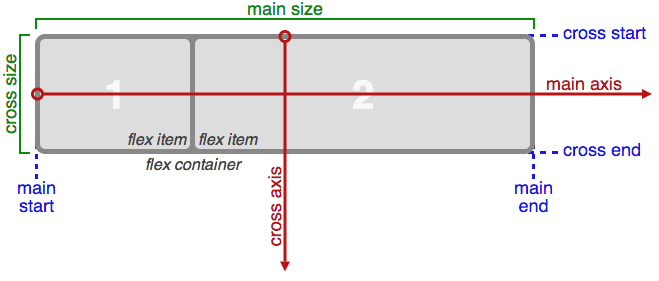
flex 拥有主轴侧轴的概念,可以简单地理解为 XY 坐标系。默认横向为 X 轴,纵向为 Y 轴。可以通过 flex-direction 作用于容器来改变设置。在主轴上子元素的对齐由 justify-content 控制,侧轴子元素对齐由 align-items 控制,同时还可以控制元素显示顺序的 order,相关具体意义及备选值可查看 W3C 草案

flex

很不幸,flex 语法目前仍然处于草案阶段,并且经历了一次 box 旧语法的废弃————上面例子中的语法是最新的写法,从2009年开始各浏览器厂商陆续实现了一种现在被废弃的 box 语法,我们称之为老语法。更糟糕的是,微软的 IE10(包括桌面端和移动端)浏览器实现了一种介于新语法和旧语法之间的中间语法。下面的表格列举了这三种语法的API:

含义 新语法(-webkit- -moz-) 老语法(-webkit- -moz-) IE10语法
1 弹性容器定义 display : flex/inline-flex display : box/inline-box display : -ms-flexbox
2 子元素排列方式 flex-direction : row/ column-row/column/column-reverse box-orient : horizontal/vertical/inline-axis/block-axis/inherit -ms-flex-direction : row/column/row-reverse/column-reverse/inherit
3 主轴子元素对齐 justify-content : flex-start/ flex-end/center/space-around/space-between box-pack : start/end/center/justify -ms-flex-pack : start/end/center/justify
4 侧轴子元素分布 align-content : flex-start/ flex-end/center/space- around/space-between NOT SUPPORTED -ms-flex-line-pack: start/end/center/justify/distribute/stretch
5 侧轴方向子元素对齐 align-items : flex-start/flex-end/center/stretch box-align : start/end /center/baseline/stretch -ms-flex-align : start/end/center/baseline/stretch
6 弹性子元素伸缩值 flex : [positive-flex] [negative-flex] [preferred-size] box-flex : [positive-flex] -ms-flex : [positive-flex] [negative-flex] [preferred-size]
7 子元素排列顺序 order : 1 box-ordinal-group : 1 (positive) -ms-flex-order : 1
8 在子元素中覆盖父元素定义的第5项 align-self : flex-start/flex- end/center/stretch NOT SUPPORTED -ms-flex-item-align : auto/start/end/center/baseline/stretch
9 换行 flex-wrap : wrap/no-wrap/wrap-reverse NOT SUPPORTED -ms-flex-wrap : none/wrap/wrap-reverse

需要指出的是新语法支持多行模式,老语法并不支持。

浏览器支持

Chrome,Safari,Opera,Firefox,IE10+,Android对可伸缩布局进行了支持,其中一些版本仅支持老语法,而另一些同时支持两种语法,查看这里

因此似乎针对 iOS , Android 和 Windows Phone 8 移动设备开发的网站更适合应用 flex 技术,因为这些平台的浏览器都支持其中至少一种语法。针对 PC 你需要一种优雅的降级。

我做了一些针对不同语法的测试,在这里

总结有几点需要注意:

  • 针对 webkit 编程,需要兼容老语法,目前大多数使用 webkit 的浏览器都还不支持新的语法;
  • 仅在横向方向上应用 flex,垂直放向上可以看见老语法在分配高度比例时存在问题;
  • 如果子元素的内容区大小不同时,老语法会引起子元素的不均匀分配,即使子元素能够容纳其内容,这个时候,只要为每个子元素设定 width:100%即可,新语法和IE10在这方面没有问题,即使子元素的内容区溢出。opera(presto)在这个问题上处于中间状态,即内容区不溢出,子元素按照预订比例分配,如果溢出,子元素将会被撑大;
总结

flex 在针对现在浏览器编程的环境中是一个很方便的工具,IE11 和 Firefox 现在已经实现了无前缀的语法,相信 webkit 也会很快完成转换,届时新语法就会成熟,但老版本的 webkit 仍在存在很大的市场,因此在书写可伸缩 CSS 代码时仍然要兼容老语法,这会限制 flex 的应用。相对于普通的百分比计算方法,老语法提供的功能仍然足够日常使用。

另外,可以使用 autoprefixer 来自动屏蔽这三个版本之间的差异。

参考

定义

在几个 getElementsBy* 方法中,getElementsByName 算是比较特殊的,表面上看即只有它不能在 Element 上调用。

W3C 将该方法定义在 HTMLDocument 接口中:

interface HTMLDocument : Document {
           attribute DOMString       title;
  readonly attribute DOMString       referrer;
  readonly attribute DOMString       domain;
  readonly attribute DOMString       URL;
           attribute HTMLElement     body;
  readonly attribute HTMLCollection  images;
  readonly attribute HTMLCollection  applets;
  readonly attribute HTMLCollection  links;
  readonly attribute HTMLCollection  forms;
  readonly attribute HTMLCollection  anchors;
           attribute DOMString       cookie;
    
  void               open();
  void               close();
  void               write(in DOMString text);
  void               writeln(in DOMString text);
  NodeList           getElementsByName(in DOMString elementName);
};

按照此定义, getElementsByName 方法应该仅存在于 HTMLDocument 中而非 Document 中。在能够访问 Document 接口的浏览器(Opera,Chrome,Firefox,Safari和 Internet Explorer 10)中,测试下列代码:

!!Document.prototype.getElementsByName

结果如下:

浏览器 Opera Chrome Firefox Safari IE10
结果 false true false true true

分别观察一下 GeckoWebkit 关于 (HTML)Document 部分的 IDL :

//Gecko 中 HTMLDocument.webidl 文件
interface HTMLDocument : Document {
NodeList getElementsByName(DOMString elementName);
};
//Webkit 中 Document.idl 文件
interface Document : Node {
NodeList getElementsByName([Default=Undefined] optional DOMString
}

可见两者将 getElementsByName 定义在了不同的接口中,似乎 Gecko 的做法更符合 W3C 规范。

对此的解释可能是 WebkitInternet Explorer 按照 whatwg 的 HTML5 草案进行了实现。

返回类型

关于 getElementsBy* 方法的返回类型,whatwg 规定为 HTMLCollectionW3C 规定为 NodeListHTMLCollectionNodeList 两者很类似,都有 length 属性,都可以用数字索引或 item() 方法方位其中元素。但其差异也是明显的,前者成员为 HTMLElement ,而后者为 Node ,前者拥有 namedItem() 方法。现代浏览器对其实现不一致:

浏览器 Opera/Safari/Android Chrome/Firefox Internet Explorer(+WP8)
getElementsByTagName NodeList HTMLCollection HTMLCollection
getElementsByName NodeList NodeList HTMLCollection
getElementsByClassName NodeList HTMLCollection HTMLCollection

显然应该退化到 NodeNodeList 进行编程,避免依赖特定的类型返回值。

Connection 是一种 HTTP 通用头,应用于 HTTP 请求与响应首部之中,几乎广泛地存在于每一个可见的连接之中。最常见的取值为 closekeep-alive ,前者表示请求响应完成之后立即关闭连接,后者表示连接不立即关闭,可以期望继续响应下一个请求。

close 很容易理解,关于 keep-alive ,我们知道 HTTP 建立在 TCP 传输层协议之上,而 TCP 的建立需要握手,关闭需要发通知,这些步骤都需要时间,带给 HTTP 的就是请求响应时延。

close 模式请求3个资源的时间线是这样的:

服务器--------------------------------------------
        /   \           /   \            / \
       /     \         /     \          /   \
      /       \       /       \        /     \
浏览器--------------------------------------------

那么 keep-alive 模式就可能就是这样的:

服务器--------------------------------------------
        /   \     /   \     / \
       /     \   /     \   /   \
      /       \ /       \ /     \
浏览器--------------------------------------------

这里忽略了软件的数据处理时延,可以明显的看到节省了 TCP 连接建立时间和连接关闭时间所带来的益处。另外,这种方式也可以避免 TCP 多次经历慢启动过程,其带来的时间受益并没有在图中表现出来。

这样看来,keep-alive 应该一直使用来提高 web 加载性能。

哑代理问题

HTTP 首部可分为两类hop-by-hopend-to-end

  • End-to-end headers which are transmitted to the ultimate
    recipient of a request or response. End-to-end headers in
    responses MUST be stored as part of a cache entry and MUST be
    transmitted in any response formed from a cache entry.

  • Hop-by-hop headers which are meaningful only for a single
    transport-level connection and are not stored by caches or
    forwarded by proxies.

显然 hop-by-hop 是不能缓存不能被代理转发的,下面即 HTTP 1.1 定义的8个 hop-by-hop 首部,其它均属于 end-to-end 首部。

因此理论上 Connection 首部是不能被代理、中继等中间 HTTP 节点转发的,另外根据 RFC2616 的定义:

Connection = “Connection” “:” 1#(connection-token)

connection-token = token

Connection 列举的所有 HTTP 首部都不能被转发,如一个请求头中如下:

GET / HTTP/1.1

Accept: /

Connection:Proxy-Time Non-Header Keep-Alive

Proxy-Time:0810

Keep-Alive: max=5 timeout=120

经过代理后应该被修改为:

GET / HTTP/1.1

Accept: /

即移除 Connection 首部及其列举的其它首部。但这是理想情况,万维网上还工作着无数称之为哑代理的盲中继:它们仅把数据按字节转发,并不理会 HTTP 首部中的意义。在这种情况下,就会出现一些非预期的状况:

    ____       keep-alive      ____      keep-alive       ____
   |    |   =+++++++++++++++- |    |  =+++++++++++++++-  |    |
   |    |      keep-alive     |    |     keep-alive      |    |
   \____/   -+++++++++++++++= \____/  -+++++++++++++++=  \____/

   Browser                     Proxy                     Server

如上图,浏览器向服务器发送带有 Connection:Keep-Alive 的请求,中间经过一个哑代理,从而导致该首部到达服务器。对于服务器来说,代理与浏览器没有什么分别,它认为浏览器(代理)尝试建立 Keep-Alive 连接,便在响应头中发回 Connection:Keep-Alive ,并保持连接开启。哑代理将响应首部原封不动的发回给浏览器,并等待服务器关闭连接。浏览器收到响应数据后立即准备进行下一条请求。此时,浏览器和服务器都认为与对方建立了 Keep-Alive 连接,但是中间的代理确对此一无所知。因此哑代理不认为这条连接上还会有请求,接下来来自浏览器的任何请求都会被忽略。这样,浏览器和服务器都会在代理处挂起,直到一方超时将连接关闭为止。这一过程不仅浪费服务器资源,也使得浏览器响应缓慢或失败。

Proxy-Connection

一个变通的做法即是引入一个叫做 Proxy-Connection 的新首部。在浏览器后面紧跟代理的情况下,会以 Proxy-Connection 首部取代 Connection
首部发送。如果代理不能理解该首部,会透传给服务器,这不会带来任何副作用,服务器仅会将其忽略;如果这个代理足够聪明(有能力支持这种 Keep-Alive 连接),会将 Proxy-Connection 首部替换成 Connection 发送给服务器,从而达到建立双向 Keep-Alive 连接的目的。

我们可以开启 Fiddler 并观察 Chrome 或 IE 开发工具中 Network中的请求头,都会有 Proxy-Connection 。Firefox好像并没有发送这个首部,Safari可能同时发送了 Proxy-ConnectionConnection 首部,Fiddler 没有移除 Connection 首部但将 Proxy-Connection 替换为 Connection ,导致出现两个 Connection 首部。

显然,在聪明代理和哑代理共存的链路上,上面的提到的挂起的问题仍然存在,Proxy-Connection并没有从根本上解决问题。其实 Proxy-Connection 也并非是一个标准的协议首部,任何标准或草案中都没有提到它,仅仅是应用广泛罢了。

持久化连接

HTTP 1.1 已经废弃了使用 Keep-Alive,而以”持久化连接”的概念取代之。与 HTTP 1.0 不同的是,在 HTTP 1.1 中,持久化连接是默认开启的,除非你手动设置 Connection:close。为了避免收到哑代理误转发过来的 Keep-Alive ,HTTP 1.1 代理应当拒绝与所有来自 HTTP 1.0 设备建立持久化连接(实际厂商并非如此)。

管道

HTTP 1.1 还提供了在持久化连接基础上的一个性能优化特性:请求管道。它可以在一条连接上同时发起多个请求而不必等到前面的请求得到响应,降低网络的环回响应时间,如下图:

服务器--------------------------------------------
        /\/\/\/\
       / /\/\/\ \
      / / /\/\ \ \
浏览器--------------------------------------------

但使用请求管道有一些限制:

  • 连接必须是持久的;
  • 服务器必须按照请求的顺序返回;
  • 浏览器必须能应对部分请求失败的情况,并重试;
  • 不能进行非幂等这类可能带来副作用的请求,如 POST 请求,因为无法安全重试。

一些现代的浏览器支持管道但利用尚不广泛,特别是页面使用较多域名的情况下,管道技术更是难以施展。SPDY 技术更进一步,做到了跨域的多路复用,理论上可以让web的加载速度有显著提升,期待该技术的普及。

参考

在需要主子域跨域技术的应用场景中,父 frame 和子 frame 设置相同的 document.domain 是一种特别常用的方式,我们可以看见腾讯公司的页面中很多都会有一句:

document.domain = "qq.com";

qq.com 域页面的登录行为很多都是依赖这种方式与iframe结合来实现的。

事实上,W3C 的 DOM 2 HTML标准document.domain定义为只读的:

domain of type DOMString readonly
The domain name of the server that served the document or null if the server cannot be identified by a domain name.

HTML5 草案 中有关于对 document.domain赋值的内容。

WebkitDocument.idl 源码中对 domain 有这样的定义:

#if defined(LANGUAGE_JAVASCRIPT) && LANGUAGE_JAVASCRIPT
    [TreatNullAs=NullString  SetterRaisesException] attribute DOMString domain;
#else
    readonly attribute DOMString domain;
#endif

这也说明了 domain 设置为“writable” 仅用于页面脚本:即允许主子域脚本进行通信,但不涉及 localStorageindexedDBXMLHttpRequest 的共享。目前市场上主流浏览器都支持 domain可写,可以满足几乎所有主子域脚本通信需求,但在特殊情况下也有些许不同。

所有浏览器都不支持设置 domain 为当前域子域或不完整的超域,比如当前域为 “abc.google.com” 那么设置 domain 为 “www.abc.google.com” 或”ogle.com” 都是不允许的。现在测试各个浏览器在 host 为以下情形下设置不同domain的反应:

  • 为IP地址
  • 单节域名
  • 多节域名

测试 host 为 “google”、“www.google.com”、“10.11.202.231”。由子域名向父域名测试,因此前面的测试不会对后面的测试造成干扰。

UA/host google www.google.com 10.11.202.231
Firefox(Mac/Windows/Android) s.ff m.ff ip.ff
Safari(iOS/Mac/Windows) s.safari m.safari ip.safari
IE6~7 s.ie67 m.ie67 ip.ie67
Chrome(Mac Windows)/IE8~10/Opera(presto内核 Mac/Windows) s.chrome-ie810-opera m.chrome-ie810-opera ip.chrome-ie810-opera
IE(WP8) 无法打开 m.chrome-ie810-opera ip.chrome-ie810-opera

由上表可得出以下结论:

  • Firefox 可以接受带 port 的父域名,但是任意 port 都会被忽略,其它浏览器则会报错;
  • 对于 IP 地址,IE6、IE7 和 Safari 简单地将其当做为域名;
  • 仅 Safari 允许将 domain 设置为最后一节域名。

Safari 以及 国内几乎所有带 webkit 内核的浏览器 使用了一种相对简单的方式,即在字符串层面上新的 domain 是当前 domain 的“父域名”即可,可以从 webkitDocument.cpp 文件的源代码中看出:

void Document::setDomain(const String& newDomain  ExceptionCode& ec)
{
if (SchemeRegistry::isDomainRelaxationForbiddenForURLScheme(securityOrigin()->protocol()))     {
        ec = SECURITY_ERR;
        return;
    }

    // Both NS and IE specify that changing the domain is only allowed when
    // the new domain is a suffix of the old domain.

    // FIXME: We should add logging indicating why a domain was not allowed.

    // If the new domain is the same as the old domain  still call
    // securityOrigin()->setDomainForDOM. This will change the
    // security check behavior. For example  if a page loaded on port 8000
    // assigns its current domain using document.domain  the page will
    // allow other pages loaded on different ports in the same domain that
    // have also assigned to access this page.
    if (equalIgnoringCase(domain()  newDomain)) {
        securityOrigin()->setDomainFromDOM(newDomain);
        return;
    }

    int oldLength = domain().length();
    int newLength = newDomain.length();
    // e.g. newDomain = webkit.org (10) and domain() = www.webkit.org (14)
    if (newLength >= oldLength) {
        ec = SECURITY_ERR;
        return;
    }

    String test = domain();
    // Check that it's a subdomain  not e.g. "ebkit.org"
    if (test[oldLength - newLength - 1] != '.') {
        ec = SECURITY_ERR;
        return;
    }

    // Now test is "webkit.org" from domain()
    // and we check that it's the same thing as newDomain
    test.remove(0  oldLength - newLength);
    if (test != newDomain) {
        ec = SECURITY_ERR;
        return;
    }

    securityOrigin()->setDomainFromDOM(newDomain);
}

因此即使是IP地址或是最后一节 domain 也会被允许设置。Internet Explorer 不开源,但可以猜测其对多节域名进行了最后一节域名限制,在 IE8+ 上增加了IP地址限制。Firefox 在3.0版本增加了此限制。对于单节域名如 http://hello/,所有浏览器都一致性地允许设置,当然,这相当于设置 domain 为自身。

Firefox浏览器忽略 port 的行为初衷不得而知,但可以测试该特性是在3.0版本上增加的。

值得一提的是,chromium 项目对 webkit 进行了一些修改,从而带来了一些新的特性,观察 Document.cpp 文件的源代码:

void Document::setDomain(const String& newDomain  ExceptionState& exceptionState)
{
    if (isSandboxed(SandboxDocumentDomain)) {
        exceptionState.throwSecurityError("Assignment is forbidden for sandboxed iframes.");
        return;
    }

if (SchemeRegistry::isDomainRelaxationForbiddenForURLScheme(securityOrigin()->protocol()))     {
    exceptionState.throwSecurityError("Assignment is forbidden for the '" + securityOrigin()->    protocol() + "' scheme.");
        return;
    }

    if (newDomain.isEmpty()) {
        exceptionState.throwSecurityError("'" + newDomain + "' is an empty domain.");
        return;
    }

OriginAccessEntry::IPAddressSetting ipAddressSetting = settings() && settings()->treatIPAddressAsDomain() ? OriginAccessEntry::TreatIPAddressAsDomain :     OriginAccessEntry::TreatIPAddressAsIPAddress;
OriginAccessEntry accessEntry(securityOrigin()->protocol()  newDomain      OriginAccessEntry::AllowSubdomains  ipAddressSetting);
    OriginAccessEntry::MatchResult result = accessEntry.matchesOrigin(*securityOrigin());
    if (result == OriginAccessEntry::DoesNotMatchOrigin) {
    exceptionState.throwSecurityError("'" + newDomain + "' is not a suffix of '" + domain() + "'.    ");
        return;
    }

    if (result == OriginAccessEntry::MatchesOriginButIsPublicSuffix) {
        exceptionState.throwSecurityError("'" + newDomain + "' is a top-level domain.");
        return;
    }

    securityOrigin()->setDomainFromDOM(newDomain);
    if (m_frame)
        m_frame->script().updateSecurityOrigin(securityOrigin());
}

可见除了支持HTML5的 sandbox 之外,还增加了IP地址检测,因此 Chrome 才不会像Safari那样允许IP地址的一段设置为 domain。特别地,Chrome 还进行了顶级域名检测, chromium 项目会生成一个 effective_tld_names.gperf 文件,提供了很多域名列表,末尾标记不为0的域名将不能设置为 document.domain。比如,一个域名为www.english.uk的页面,在 Chrome 下将不能设置 document.domainenglish.uk,因为 english.uk 被认为是顶级域名从而报错:

SecurityError: Failed to set the ‘domain’ property on ‘Document’: ‘english.uk’ is a top-level domain.

这部分逻辑的一些代码来自 Mozilla ,因此Firefox (3.0+)也具有同样的特性。

截止今天(2014-04-24),这个列表至少包含472个顶级域名,包括孟加拉国、文莱、库克群岛、塞浦路斯、厄立特里亚、埃塞俄比亚、斐济、马尔维纳斯群岛、关岛、以色列、牙买加、肯尼亚、柬埔寨、科威特、缅甸、莫桑比克、尼加拉瓜、尼泊尔、新西兰、巴布亚新几内亚、土耳其、英国、也门、南非、赞比亚、津巴布韦等国家和地区的顶级域名。想必这些国家的网站在设置 document.domain 时会遇到一些困难了:)。

在对IE浏览器进行测试时,也发现了一些奇怪的事情。实验“aa.bb.cc.dd”域名,发现在 IE8+ 下将不能设置 document.domain 为“cc.dd”。经过反复测试发现 IE8+在多节域名下允许设置 的双节域名中,两节单词中要至少有一个大于2个字母,换言之,下列域名都是不允许的:

  • sa.cn
  • o.jp
  • x.m

但下列是允许的:

  • sax.cn
  • o.com
  • xxx.k

暂不知微软用意为何,但可以联想到,新浪微博的短域名 t.cn在有下一级域名的情形下,将不能设置 document.domaint.cn

即便拥有上面的诸多问题,不过都属于特例,除了 IE8+ 的短域名问题,其它基本都不会在日常的开发中遇到。

参考
  1. http://javascript.info/tutorial/same-origin-security-policy
  2. http://msdn.microsoft.com/en-us/library/ie/ms533740(v=vs.85).aspx
  3. https://developer.mozilla.org/en-US/docs/Web/API/document.domain
0%